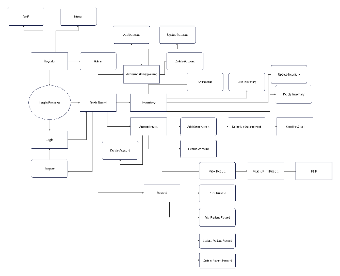
Designed with EdrawMax, this template is a diagram for a medical practice management system. It starts with a "Login Process" where users can "Login" or "Logout", and can also "Register" as "Staff" or "Nurse". Once logged in, users access a "Dash Board" which branches into multiple functions. These include "Account Management" for actions like adding, updating, and deleting accounts, "Inventory" management with options to add, update, or delete inventory items, "Appointment" scheduling with features such as adding, updating, and sending appointments to Gmail, and "Record" handling for viewing, printing, adding, updating, and deleting patient records. This diagram serves as a visual guide for understanding and implementing a medical practice management system.



 Desktop